AI CRM & WhatsApp automation for Malaysian businessesLess busywork.More business.
Build your own AI chatbot and no-code workflows that reply on WhatsApp, Instagram, Facebook and more, 24/7, in English, Chinese and Malay. Capture every lead, send broadcasts, and book appointments straight into Google Calendar.
Hi! I saw your property listing. Is the weekend viewing still available?10:42 am
Answered by DJC AI
Hi Sarah! Yes, we have viewings this Saturday and Sunday. Would you prefer a morning or an afternoon slot?10:42 am
Saturday morning would be perfect, thank you!10:43 am
Try it here: a sample inbox, pipeline and AI workflow.
WhatsApp, Instagram, Facebook and more. Finally on the same page.
WhatsApp
Instagram
Facebook
Telegram
LINE
Zalo
Email
WhatsApp
Instagram
Facebook
Telegram
LINE
Zalo
Email
WhatsApp
Instagram
Facebook
Telegram
LINE
Zalo
Email
WhatsApp
Instagram
Facebook
Telegram
LINE
Zalo
Email
Your AI chatbot. Working day and night.
Our AI assistants work 24/7, holidays included. Designed for Malaysia's diverse market, they reply in English, Chinese or Malay, in the cultural context each customer expects.
A property agent assistant that introduces itself and offers a sales gallery appointment.
*Sample conversations between the AI assistant and customers.
Books straight into Google CalendarThe assistant checks your real-time availability and confirms client consultations without the back-and-forth.
Trained on your businessPackages, prices, office hours, availability: the assistant answers from your own knowledge and hands over to your team when it matters.
Get started in less than 60 seconds • Cancel anytime
One CRM. Every step of the sale.
Whether you're just starting your automation journey or scaling existing capabilities, there's a place to begin. A look inside the system:
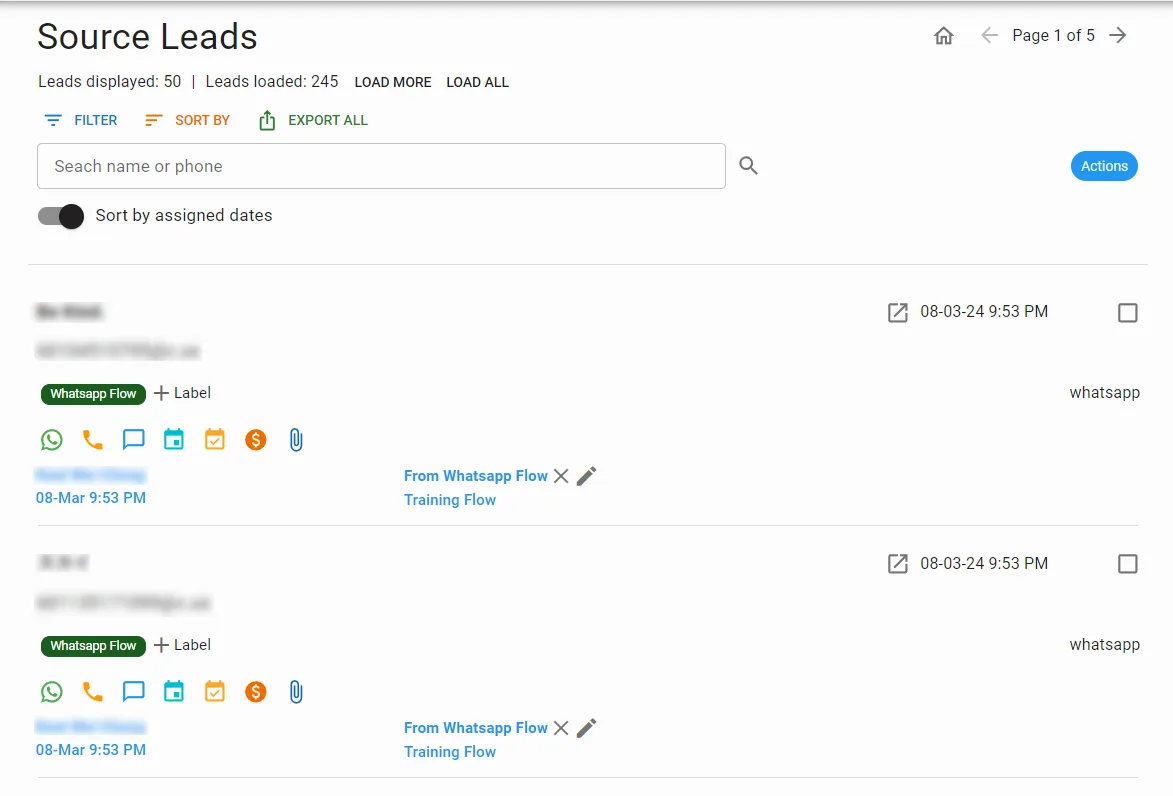
*Sample system UI screenshot — Source leads view with WhatsApp flow labels
Every lead captured. Nothing left to chance.
A direct pipeline from your Facebook page and WhatsApp flows straight into your dashboard, so every potential lead is captured without manual effort. Call, schedule meetings, assign tasks, and track progress in real time.
Facebook & WhatsApp leads flow in automatically
Direct calls, appointments, and task assignment
Labels, filters, exports, and progress tracking
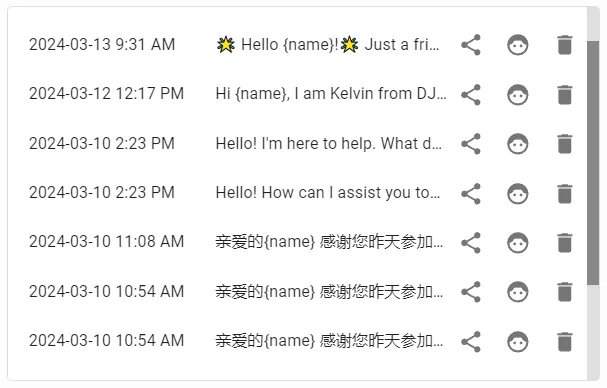
*Sample system UI screenshot — Broadcast history with message templates
Reach everyone in a single click.
Message multiple recipients without saving numbers or navigating tedious steps. Set customisable delays so promotions and announcements land at the right moment, then track delivery status in real time.
Customisable delay between messages
Real-time delivery status tracking
Delegate broadcast roles within your team
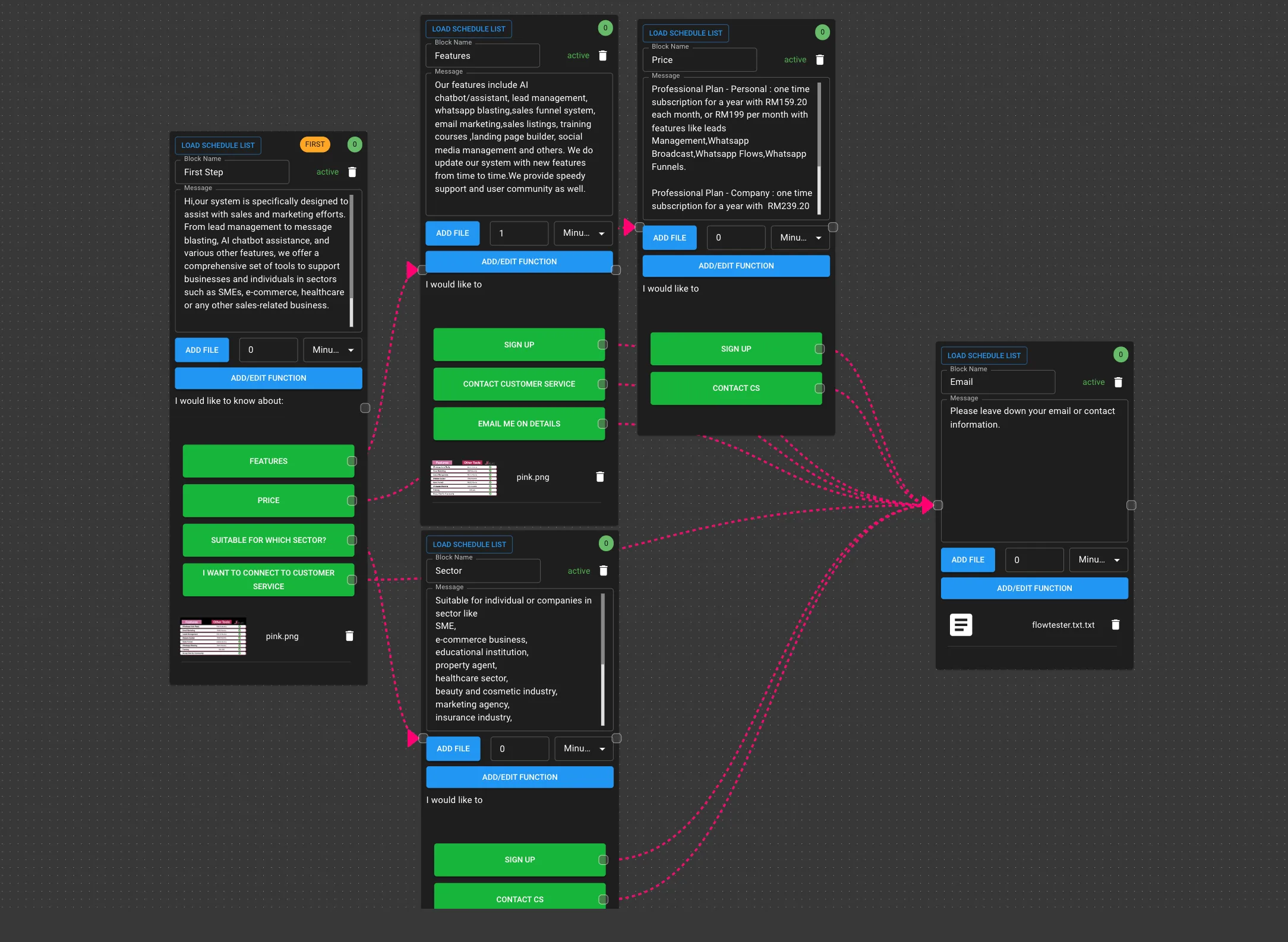
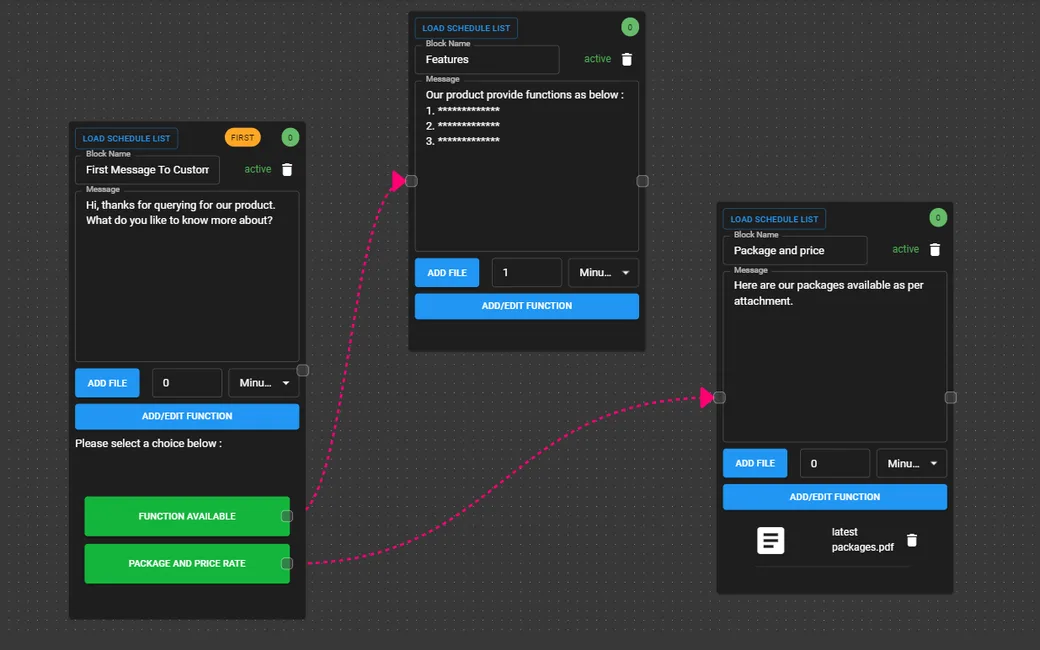
*Sample system UI screenshot — WhatsApp flow builder with branching replies and attachments
Design conversations visually. No code required.
Build WhatsApp auto-reply flows with drag-and-drop blocks: greet, branch on the customer's choice, attach files and price lists, and hand over to your team when it matters. Built for newcomers and power users alike.
Hi Wei Jie! Yes, two 3-room units are left, on levels 12 and 18. Both include 2 parking bays. Would you like to view one this Saturday?
now
Wei Jie
Saturday 11am works
Sales Team · AI
Done! You're booked for Saturday, 11:00 am at the sales gallery. See you there 👋
now
Untagged messages are left for your team
*Illustration of the AI replying in a WhatsApp group after being tagged
Your AI assistant, now in the group chat.
Add the AI to your WhatsApp groups for buyers, members, or customers. It answers from your business knowledge on every message, or only when someone tags your number, and keeps following up with that member without another tag.
Reply to every message, or only when tagged
Knows which member is asking
Pause any group from the inbox
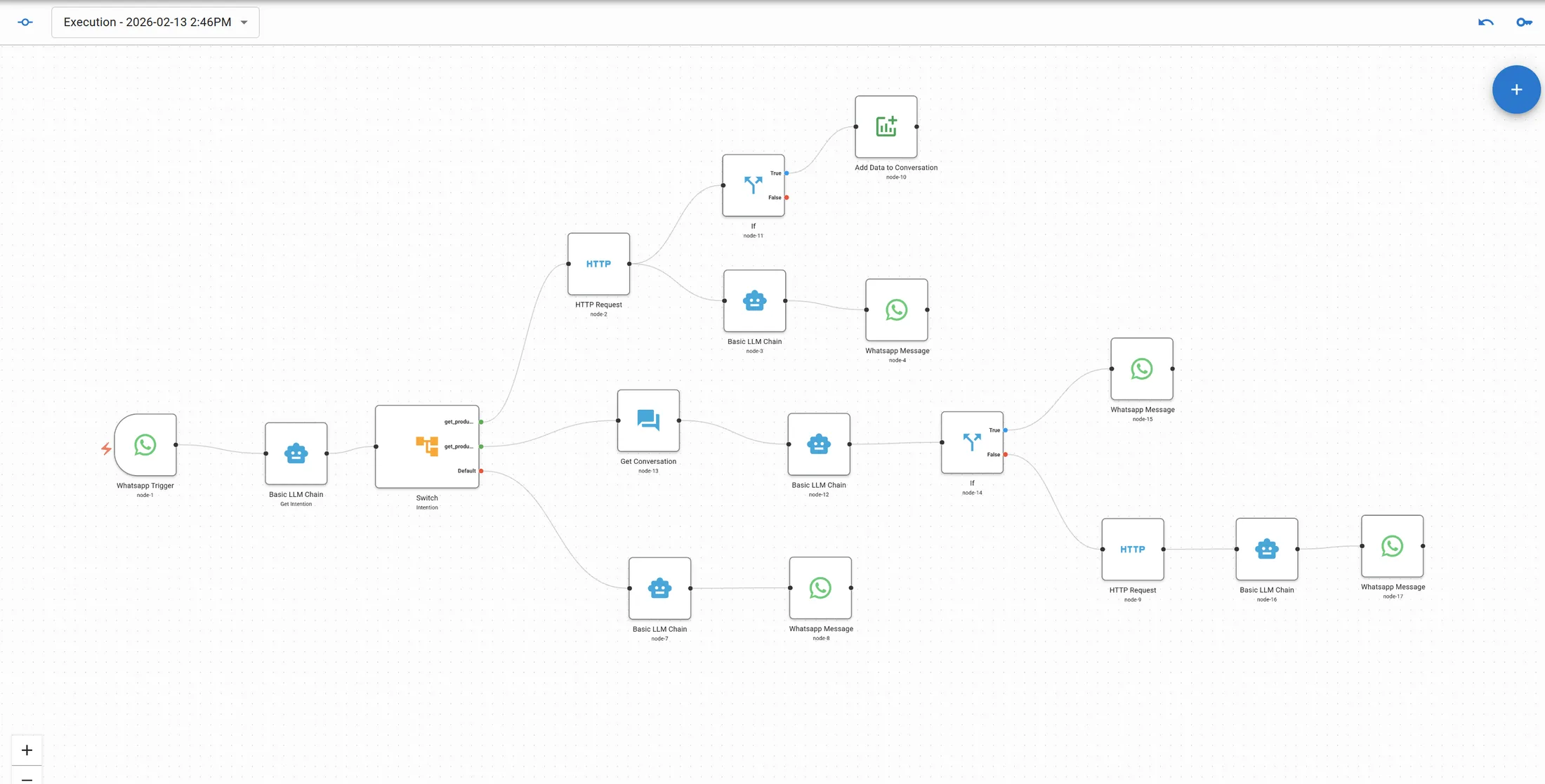
*Sample system UI screenshot — Visual workflow with a WhatsApp trigger, AI intent detection, branching, HTTP requests, and WhatsApp replies
From workflow to form to landing page.
Craft a high-converting funnel with intuitive workflow design, effortless form creation, and dynamic landing pages. Capture and nurture prospects with minimal effort and maximum impact.
Trigger workflows from WhatsApp messages or form submissions
Branch on AI-detected intent and call external APIs
Drag-and-drop forms, landing pages, and split tests
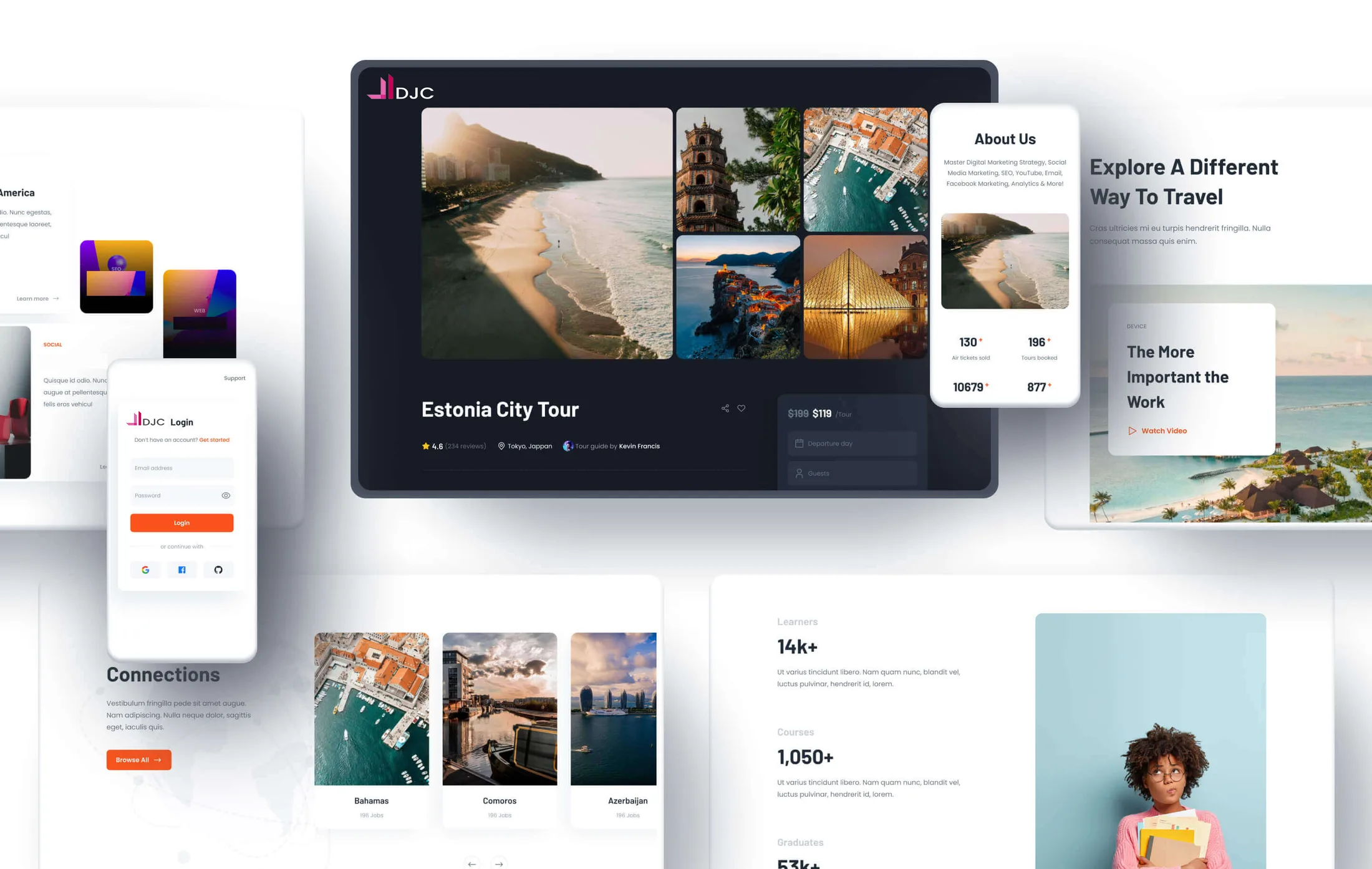
*Sample system UI screenshot — Website and landing page templates
Build and launch in minutes.
Forget the technical learning curve. Assemble forms and landing pages with a drag-and-drop editor, fully optimised for both mobile and desktop, and focus on your message and your audience.
Mobile and desktop optimised out of the box
Hosted with your own domain
Connected to forms, chat, and payments
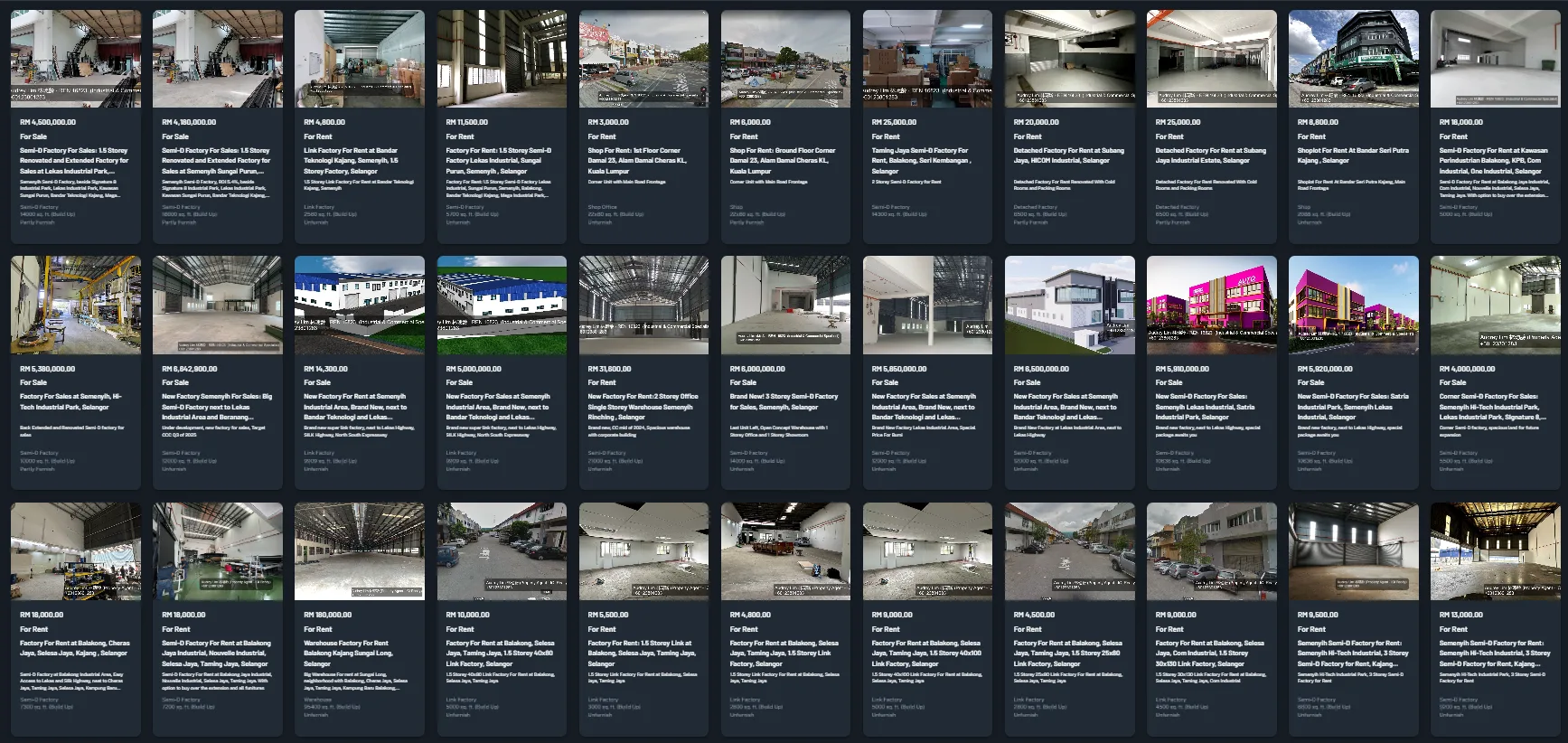
*Sample system UI screenshot — Industrial property listings on a branded page
A property showcase that feels like your own website.
From sub-sales and new launches to auctions and rentals, present listings on dedicated pages that are server-side rendered and SEO-ready. Use the default domain or connect your own.
Sub-sale, new launch, auction, and rental listings
SEO-ready server-side rendering
Custom domain support
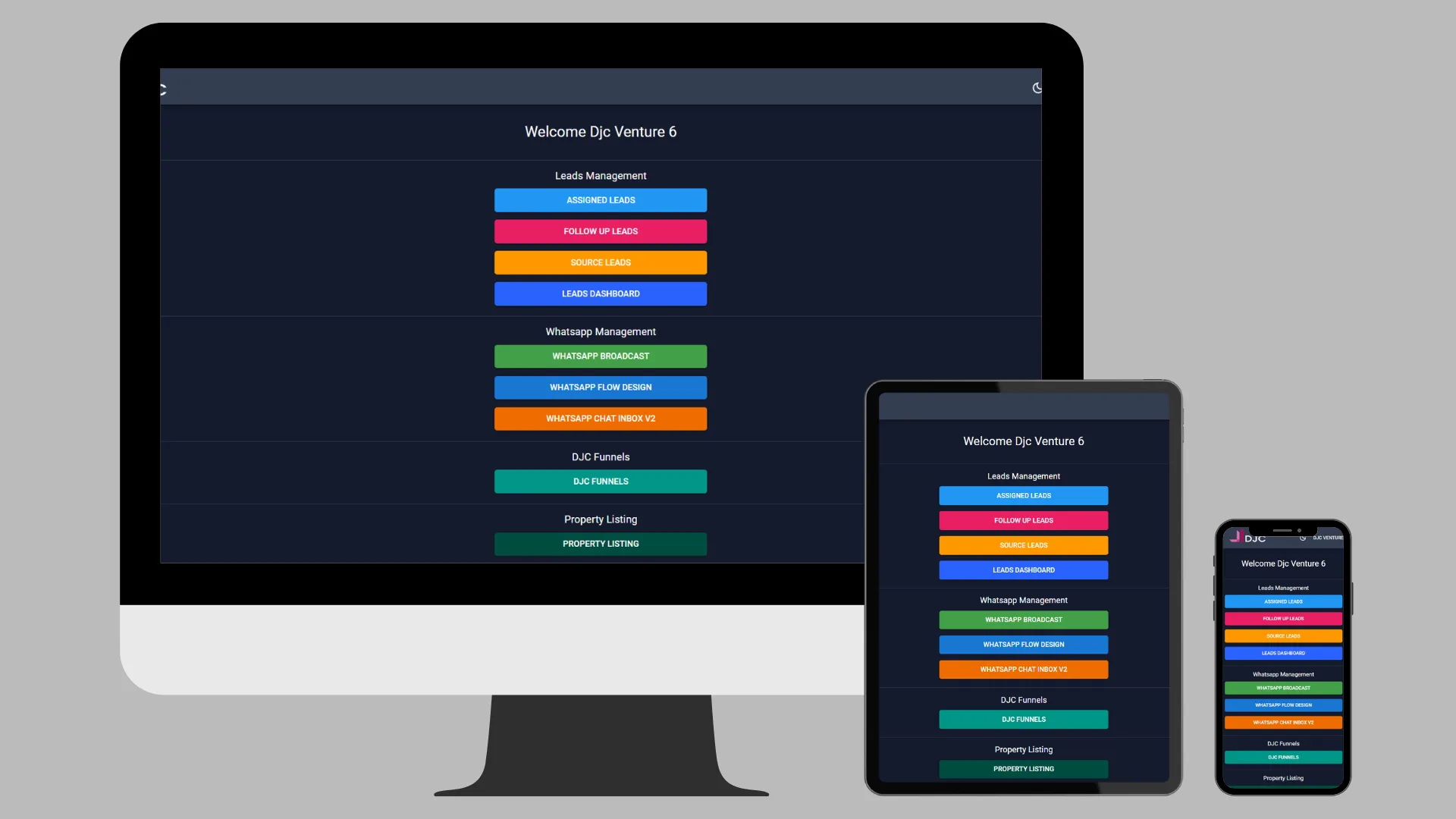
*Sample system UI screenshot — The same workspace on desktop, tablet, and phone
Your business, on every screen.
A cross-platform web app for desktop, tablet, and phone on both Apple and Android. No installations, automatic updates, and new features that arrive without lifting a finger.
No installation required
Automatic updates and new features
Dark mode and fully responsive
Businesses across sectors run on DJC.
Travel and property agents, marketing agencies, freelancers, insurance, and e-commerce: over 5,000 users and counting.
Subscribers
5,031+
Industries and sectors
100+
Messages processed daily
1 mil+
Monthly read and write operations
50 mil+
Michael JauInsurance industryCoolAI educatorTC LeowProperty agent and skincare product proxy
Everything you need. One platform.
One cost-effective, unified platform instead of the cumulative expense of many disparate systems.
AI chatbot / assistant
WhatsApp Group AI
Lead management
WhatsApp broadcast
Sales funnel system
Email marketing
Sales listings
Training courses
Landing page builder
Social media management
Affiliate system
Easy to customise
Dark mode
Fully responsive
Cross platform
Ever-evolving
Free updates
Fast support
Actionable analytics
Connected integrations
Team access controls
How DJC uses Google and protects your data.
DJC integrates with Google for automated scheduling and secure account access. We're committed to data transparency, user privacy, and strict compliance with Google's API policies.
DJC's use and transfer of information received from Google APIs adheres to the Google API Services User Data Policy, including the Limited Use requirements.
Log in seamlessly with your verified Google Account. We only request basic profile information (name, email address, profile picture) to identify your account and protect your workspace.
Google Calendar sync & smart scheduling
Let the DJC AI assistant check your real-time availability and book client consultations directly onto your Google Calendar, preventing double bookings and missed sales meetings.
Strict data privacy & security
Google user data is used solely to provide your requested scheduling and login features. We never sell your personal data or share it with third parties or ad networks.
Full ownership & immediate revocation
You can disconnect your Google integration or request complete data deletion directly from your account settings at any moment.
DJC System brings lead management, customer conversations, AI assistants, and workflow automation into one workspace. Your team can follow a lead from the first enquiry through follow-ups, appointments, and sales without losing the conversation along the way.
Can DJC auto-reply on WhatsApp, Instagram and Facebook?
Yes. Connect WhatsApp by QR pairing or the official WhatsApp Business API, plus Facebook Messenger and Instagram professional accounts, and let AI flows reply 24/7 from your business knowledge. Comment keywords on Facebook and Instagram posts can trigger a public reply, a direct message, or both. Telegram, LINE, Zalo and email are supported too. Setup requirements depend on each channel.
Can the AI chatbot reply in Chinese and Malay?
Yes. AI flows include language settings, so your assistant can serve customers in English, Chinese or Bahasa Malaysia. It answers from the business knowledge you give it and hands over to your team when a person should take over.
Can I send WhatsApp broadcasts (blasts)?
Yes. Build an audience from a spreadsheet, a saved list or your leads, personalise each message, then send now or schedule a campaign with send pacing, off-hours and opt-out handling. On the official WhatsApp Business API, broadcasts use Meta-approved templates. Message only people who agreed to hear from you.
Can I use AI and still keep my team in control?
Yes. Build AI-assisted conversations and workflows around your business knowledge, then use your team's shared workspace to manage customer conversations and follow-ups. We can help you choose where automation fits and where a human should take over.
Do I need to code to build an AI chatbot or workflow?
DJC includes a visual workflow builder for connecting triggers, messages, conditions, and actions. AI conversation flows are set up the same way, with prompts, business knowledge and trigger keywords. More advanced integrations may require additional configuration. Start with one process and expand as your team gets comfortable.
Where is DJC based?
DJC System is built by DJC HOLDINGS SDN. BHD. in Kuala Lumpur, Malaysia. Dave Chong started it in 2017 to route leads for his own property sales team; today more than 5,000 subscribers across over 100 industries use it.
How do I find the right plan for my team?
Contact us with your team size, preferred messaging channels, and the processes you want to automate. We will walk through your requirements and discuss the right setup and pricing before you commit.
Can I change my plan later on?
Yes. You can change your plan anytime, which means you can upgrade whenever you want.
Does DJC System take a percentage of my sales?
No. You retain every cent of your earnings.
Why does DJC connect with my Google Account?
DJC integrates with Google to provide secure Google Sign-In and Google Calendar synchronisation. With Calendar access, the AI assistant can check your available slots in real time and automatically schedule confirmed client appointments without manual back-and-forth.
How does DJC protect my Google data and privacy?
We adhere strictly to the Google API Services User Data Policy, including Limited Use requirements. Your Google account and calendar data is used solely to provide authentication and appointment synchronisation. We never sell your personal data, nor share it with third parties or advertisers.
Who owns the data, content, and subscribers?
You do. Any content, including your users, is 100% owned by you. DJC System does not have permission to use that content or contact your users for any reason.
If I have questions, is there someone I can talk to?
Yes. After signing up you receive an invitation to the DJC community group, where you can reach the team at any time via group chat. You can also contact us at [email protected].
Bring it all in.Connect your channels and collect enquiries in a shared workspace. No more scattered conversations.
Make it flow.Let AI and automation handle the repeatable steps. Give every lead a clear path to the right person.
Move business forward.See the whole customer journey, stay on top of opportunities, and help your team take the next step.
Less juggling.More possibility.
Bring your team, your conversations, and your ambition. We'll help you connect the dots. A real conversation. A setup that makes sense for you.